Update the android application
Publisert: 24th October 2024 (Oppdatert: 16th December 2025)
Android
Getting Started
Important: This article applies to Android app version 1.5.9 and later. If you're using an older version, you’ll need to download the latest APK file here and install it on your device.
This guide only applies to those who have installed the app as apk. If you have installed from the Play Store, you must update there
How to Check for Updates:
-
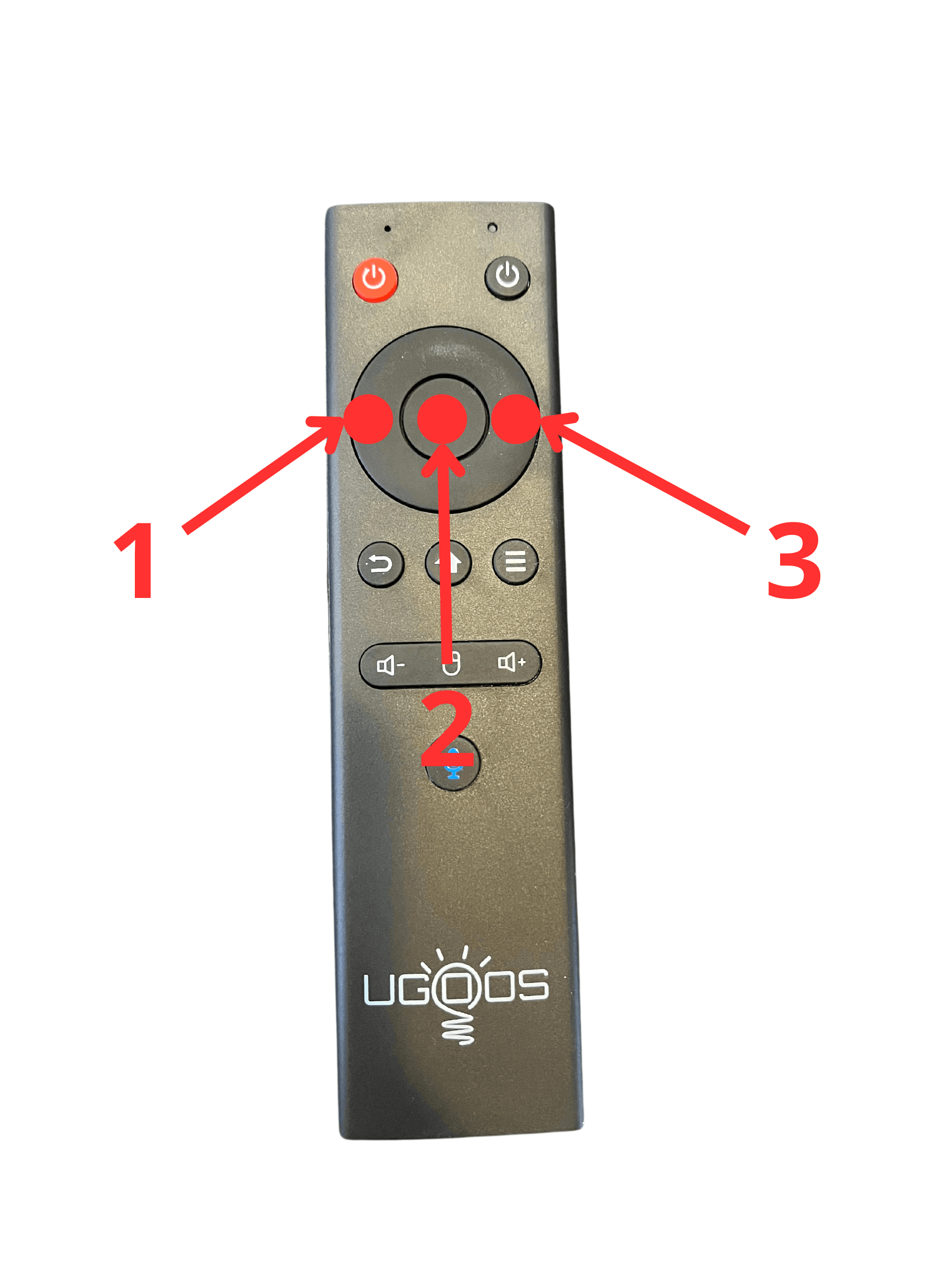
Locate your remote control and press the following keys in sequence:
LEFT – OK – RIGHT (refer to the illustration below)
Note: Your remote may look slightly different from the example shown. -
If an update is available, a message will appear on your screen. Simply press "Yes" to begin the installation.
You may need to grant permission for the installation, which will redirect you to your device's settings. Make sure the Publy app is allowed to install updates. -
If no update is available (meaning you already have the latest version), a small notification will confirm this.
Need Assistance? If you run into any issues or need help, feel free to reach out to us:
- Call us at +47 66 33 33
- Email: [email protected]
Remote illustration: